Version 2.3.0 of “littles3” has been released. This release includes enhanced serialization of business objects to support non-serializable commons logging logger implementations
Issues included in this release:
Version 2.3.0 of “littles3” has been released. This release includes enhanced serialization of business objects to support non-serializable commons logging logger implementations
Issues included in this release:
So I just released a new version of “littles3“, a project hosted at Google Code. I tried out the “Issue” feature; pretty neat. But what I really found cool was the “code review” features in the source code management. For instance, the source file that was changed in my latest release was to FileS3ObjectDao. I was able to have a diff from r21 (the old version) and r37 (the new version). It even let me comment right within the diff, in either the old or new version.
Version 2.2.0 of “littles3” has been released. This release improves performance of listing keys within a bucket. For instance, 1000 keys with version 2.10 took 3.36 minutes. With version 2.2.0, this same list of 1000 keys took 1.75 seconds.
Issues included in this release:
I have updated the littleS3 “Getting Started” wiki page, adding a “Basic Usage” section. This section includes:
So, I promised some documentation “soon” for littleS3. That was 2 months ago. Well, I have finally made good. I have just published a “Getting Started” wiki page to the project site. So far, this document provides some background on the project components, how to deploy it to an application server, and what the configuration files “configure” (along with sample configuration files in the project download section).
I would still like to add some samples of how to use the system to create buckets, add objects, etc. This is very similar to the usage described in the Amazon S3 Developer Guide for the REST API, but there is a bit of a trick since you are using your own application server. In addition to the host name, you may need to include a context path (a servlet notion) to the REST URIs.
Version 2.1.0 of “littles3” has been released. The only component change in 2.1.0 is the littleS3-2.1.0.war. This version enhances the web application configuration. The “host” value can now include a token “$resolvedLocalHost$“. Example:
host=$resolvedLocalHost$:8080
The token “$resolvedLocalHost$” will be replaced the value of InetAddress.getLocalHost().getCanonicalHostName(). This may be handy if your application server isn’t bound to “localhost“.
Version 2.0.0 of “littles3” has been released. This release restructures the project into modules: API, file system data module, and webapp. The file system module also includes support for metadata. Unfortunately, there isn’t any more documentation than before. So to get the system working, you would have to wade through the source code. But I will hopefully get some documentation created soon. 🙂
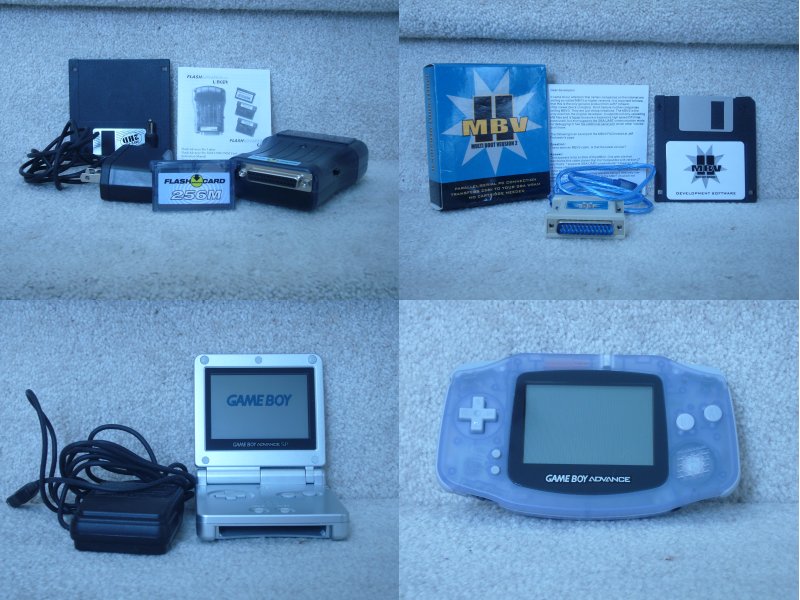 Notice that this is a non-eBay item. I tried to list it on eBay, but eBay won’t accept it because it could be used to circumvent copyright. But last time I checked, a general purpose computer could be used to circumvent copyright. I wasn’t using it to circumvent copyright. I wrote a program that would display pictures on the Game Boy. For instance, right now, the cartridge has a program that I wrote that displays two baby pictures of Sydney. I was also looking at the Game Boy hardware as a potential for some sort of visual display, like a gauge or something. It could be hooked up to the computer and display additional information on its screen, like the current number of unread emails, the current temperature, or something. I never went much further with this though because the screen was relatively hard to read in low light conditions like my normal programming environment. Hmf. DMCA and the ilk strike a blow against using hardware that you bought how you want to. Anyway, this is what the eBay listing would have been…
Includes
I haven’t actually used this hardware for a couple years. But when I was using it, I wanted to create my own programs for the Game Boy Advance. For instance, I created a little program that would display digital pictures on the Game Boy Advance. This system, along with software and information available at sites like http://www.gbadev.org can provide information on how to get started programming for a portable game system.
I have a little web application that I wrote to balance my check book. I often enter a calculated value into a form text field. I usually use the Google Calculator in the Firefox Search Bar to perform the calculations. I often perform simple calculations like “25 * .03”. (Why? I impose a personal finance fee on each credit card purchase that I make. I use a 3% fee. I put all of my personal finance fees into an online high-interest savings account. So, if I charge $25.00 on a card, I transfer “25 * .03” or $0.75 to my online savings account. It isn’t much, but it adds up.) So, yesterday, I thought, “I wonder if I can integrate Google Calculator functionality into my web application?”
Here is what I came up with.
Calculator example.
You can take a look at the source of the “calculator.html“. It includes “JPetersonCalculator100.js“, which is where the JavaScript that actually implements the calculator is sourced. The calculator function is attached to the text input field using an onKeyPress event handler in the HTML:
onkeypress="processCalculatorKeyPress(event, 2);"
Here is the processCalculatorKeyPress function.
001: /**
002:  * Handle a key press from a text field that can automatically calculate a
003:  * derived value. Basically, enter normal mathematical formula like
004:  * "5 * .03 =". When you press the equal ("=") key, the value in the text field
005:  * will be replaced with the calculated value. If the value can't be
006:  * calculated, it is left unchanged.
007:  *
008:  * @param e the event
009:  * @param precision the decimal precision to round to.
010:  */
011:  function processCalculatorKeyPress(e, precision) {
012:   var targ;
013:   if (!e) var e = window.event;
014:   if (e.target) targ = e.target;
015:   else if (e.srcElement) targ = e.srcElement;
016:   if (targ.nodeType == 3) // defeat Safari bug
017: 	targ = targ.parentNode;
018:
019:   if (e.keyCode) code = e.keyCode;
020:   else if (e.which) code = e.which;
021:
022:   if (code == 61) { // '='
023:     var expression;
024:     var result;
025:     expression = targ.value;
026:
027:     try {
028:       // calculate, evaluating arithmetic expression
029:       result = eval(expression);
030:
031:       if (typeof result == "number") {
032:         // round, if necessary
033:         if (typeof precision == "number") {
034:           if (precision > 0) {
035:             if (result.toFixed) {
036:               result = result.toFixed(precision);
037:             } else {
038:               var factor = Math.pow(10,precision);
039:               result = Math.round(result * factor) / factor;
040:             }
041:           }
042:         }
043:
044:         targ.value = result;
045:
046:         // don't display key that triggered the calculation
047:         if (e.preventDefault) {
048:           e.preventDefault();
049:         } else {
050:           e.returnValue = false; // IE
051:         }
052:       }
053:     } catch (e) {
054:       // expression wasn't an arithmetic expression, let normal text be displayed
055:     }
056:   }
057:
058:   // var character = String.fromCharCode(code);
059:   // alert('Code was: ' + code + ' Character was: [' + character + '] targ: [' + targ.value + ']');
060:
061:   return false;
062: }
Lines 12 -10 process the event, makeing a “normalized” version that handles differences in browser implementations. Since the function processCalculatorKeyPress is called for EVERY key press, line 22 filters out all key presses except for the one that we care about: the equals (“=”) key. Line 25 saves the value currently entered into the text field. Line 29 uses the JavaScript eval function to evaluate the arithmetic expression. (This is the actual calculator. The rest of the function make the results look pretty.) The “try”, on line 27, and associated “catch”, on line 53, are there to handle any error thrown by the “eval” function. An error would be thrown if the value entered into the test field was not an arithmetic expression. (Or more generally, not a valid JavaScript expression, since “eval” found evaluate any valid JavaScript expression. But that’s not really useful for the calculator.) Line 31 makes sure that the result of the “eval” is a number. Note that execution will only reach line 31 if “eval” didn’t throw an exception. Lines 33 through 41 perform any required rounding of the result. If available, line 36 uses the “toFixed” function to convert the number to the requested number of decimal places, rounding and padding with zero as necessary. If this function is not available, lines 38 and 39 perform rounding without any padding. Line 44 assigns the result of the arithmetic expression to the text input form element. Lines 47-51 indicate that the calculation succeeded so that the equals sign isn’t added to value of the text input field. Line 58 and 59 are commented out. But they illustrate how you can use an alert box to see what characters are pressed. I used this technique when developing the function.
That’s it. It should be relatively easy for you to include this build in text field calculator into your own web application. The basic steps are:
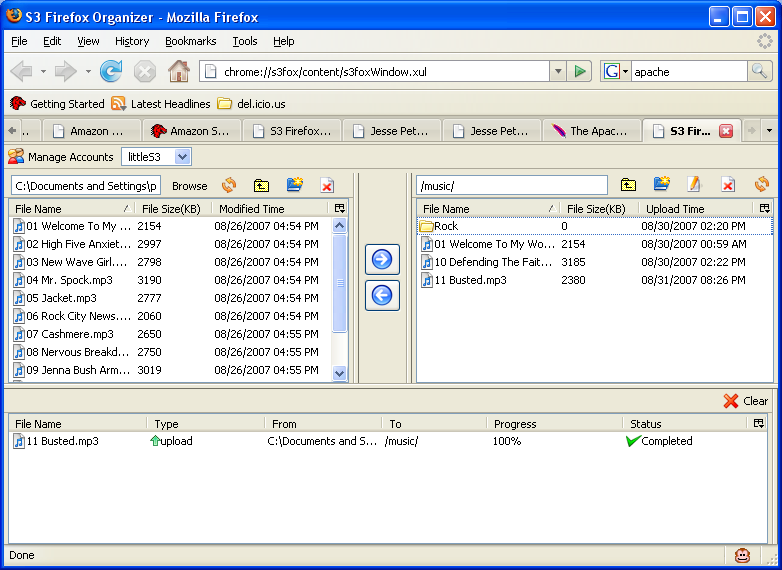 I have successfully used S3Fox Organizer with the current “littles3” source code. S3Fox Organizer is a Firefox extension which provides a simple interface for managing files with Amazon S3. To get it to work, I needed to control the resolving of “http://s3.amazonaws.com”, which is the URL that S3Fox Organizer is coded to use. I edited my machines “hosts” file, C:\WINDOWS\system32\drivers\etc\hosts on Windows, to have s3.amazonaws.com resolve to 127.0.0.1, localhost. I have “littles3” running within Tomcat. I have it running as the “ROOT” application so that there is no application context. I also have Apache running with mod_jk connecting to Tomcat.
This definitely takes advanced skills to get running and “littles3” isn’t complete yet, but this is a good integration test. The current “littles3” source code has ACL support now. It still needs to implement metadata and the ability to “provision” user accounts. But it is at a personally usable state now.